
Automation studio for small businesses

Make the busywork flow by itself.

I design AI-powered workflows that capture leads, answer customers, book appointments and keep your records in sync — so your team stops doing the same task twice.

n8nZapierMakeAirtableOpenAIGoogle Workspace

What I build

Every build is scoped around one repetitive process and expanded from there.

Lead Capture & Follow-Up

Forms, inboxes and DMs feed straight into your CRM with instant, personalised replies.

AI Assistants & Voice Agents

Chat and phone agents that answer questions, qualify leads and book into your calendar.

Back-Office Workflows

Hiring, onboarding, invoicing and reporting handled end to end without manual copy-paste.

CRM & Dashboards

Clean data models in Airtable or Sheets, plus dashboards that show what's actually working.

Covenant Ogar, founder of LaminarFlow Automation

Covenant Ogar

Founder, LaminarFlow Automation

I'm a self-taught AI automation specialist based in Lagos, Nigeria, building n8n workflows that handle the repetitive work small businesses don't have time for — lead capture, customer support, scheduling, and back-office ops. I've shipped automations across sales, hiring, and support, and I'm also completing a Nursing Science degree, which gives me an unusual edge when automating healthcare-adjacent businesses.

I work with clients across Nigeria, the US, and the UK, and I'm active on Upwork, Fiverr, Kwork, and PeoplePerHour.

Selected automations

Real systems I've shipped — the problem each one removes, and how the workflow runs.

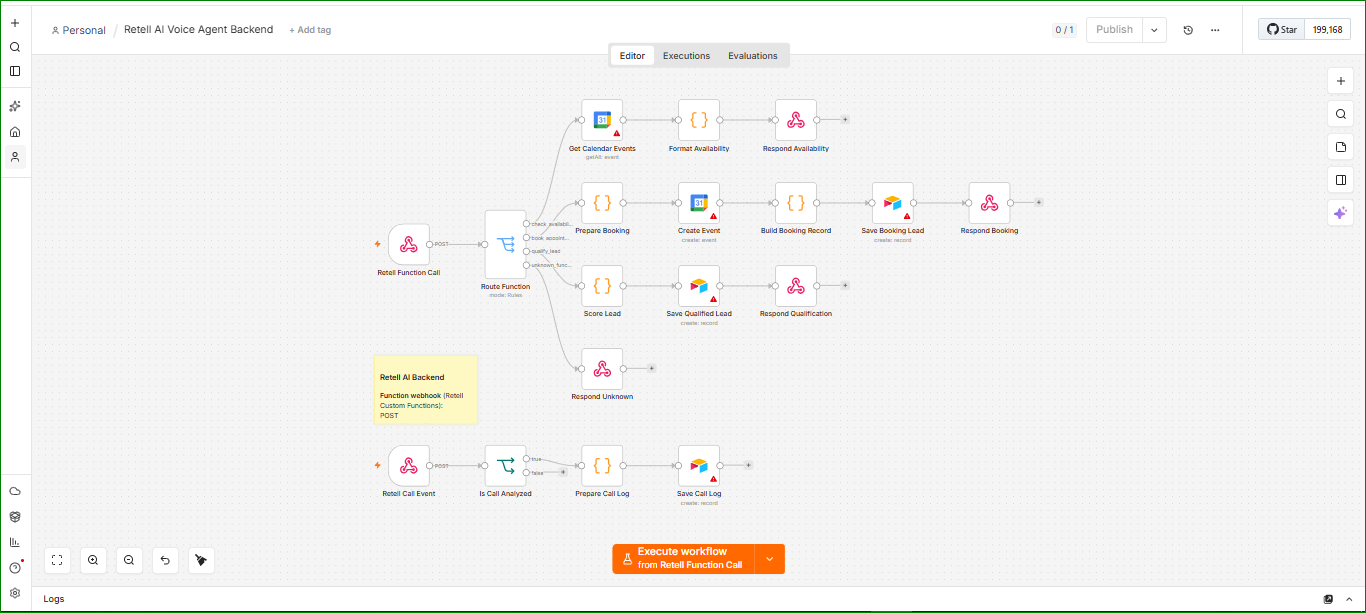
AI Voice Agent Booking Backend automation workflow diagram
n8n + Retell AIVoice AICalendarLead Qualification

AI Voice Agent Booking Backend

The problem

Businesses lose bookings when nobody picks up the phone. Calls come in after hours, staff are busy, and callers rarely leave voicemail — the enquiry simply disappears.

The workflow

  1. 1Retell AI voice agent answers the call and posts each request to a webhook.
  2. 2A router function reads the caller's intent: check availability, book an appointment, qualify a lead, or unknown.
  3. 3Availability branch pulls live Google Calendar events, formats open slots and speaks them back to the caller.
  4. 4Booking branch prepares the booking, creates the calendar event, builds the record, saves the lead and confirms out loud.
  5. 5Qualification branch scores the lead, saves it to the CRM and responds with the right next step.
  6. 6A second flow logs every completed call with its analysis for later review.

A 24/7 receptionist that books real appointments into your calendar and never drops an enquiry.
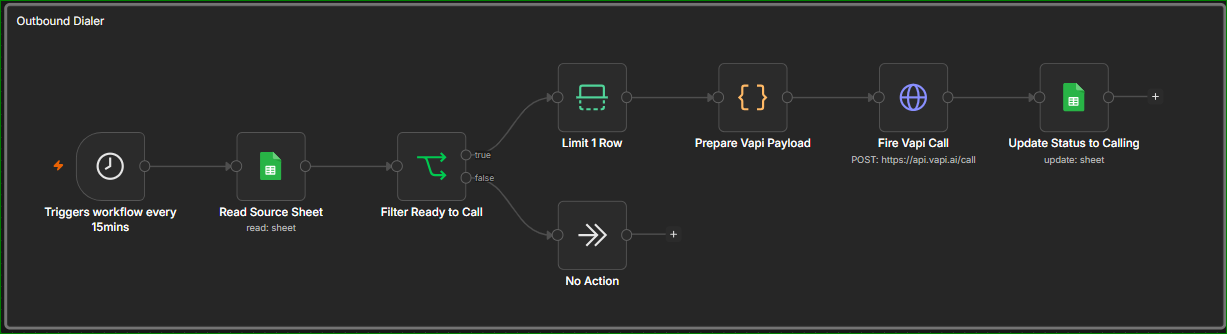
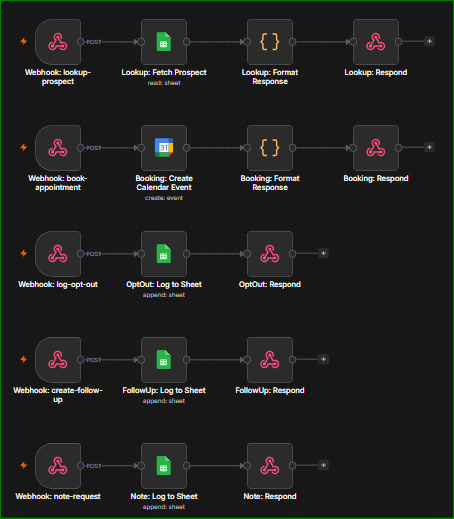
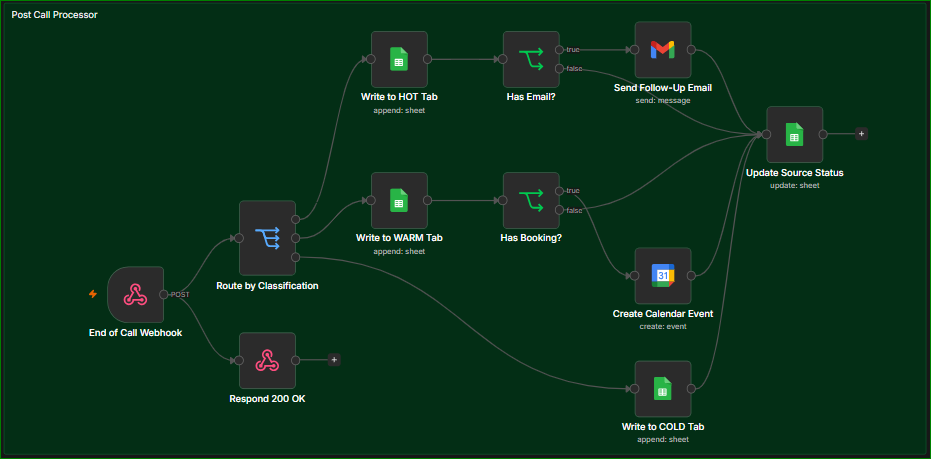
Outbound Voice Sales System automation workflow diagram
Outbound Voice Sales System workflow detail 1Outbound Voice Sales System workflow detail 2
n8n + Vapi + Google WorkspaceOutbound CallingVoice AIPost-Call Ops

Outbound Voice Sales System

The problem

Cold lead lists go stale because nobody has time to dial them, and the calls that do happen leave no record — no follow-up email, no booking, no clear next step.

The workflow

  1. 1A dialer runs every 15 minutes, reads the source sheet and filters for leads that are ready to be called.
  2. 2One row at a time is taken, a Vapi payload is prepared and the call is fired to the voice agent; the sheet status flips to 'calling'.
  3. 3During the call, tool webhooks let the agent look up a prospect, book a calendar appointment, log an opt-out, create a follow-up or save a note — each responding back to the agent live.
  4. 4When the call ends, a post-call webhook classifies the outcome and routes the lead to the HOT, WARM or COLD tab.
  5. 5Hot leads with an email get an automatic follow-up; leads with a booking get a calendar event created.
  6. 6Every path converges on a status update back to the source sheet so the list never calls the same person twice.

A self-running outbound calling desk that works the list, books meetings and leaves a clean, segmented record of every conversation.

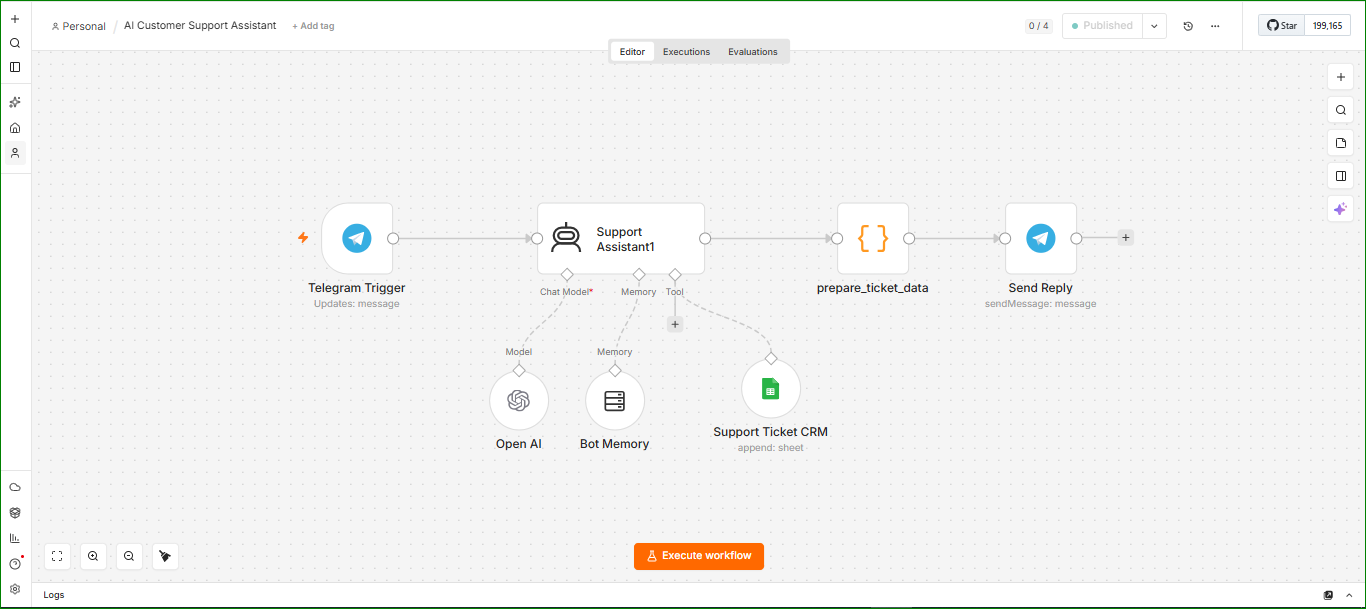
AI Customer Support Assistant with Ticketing automation workflow diagram
n8n + Telegram + OpenAISupportChatbotTicketing

AI Customer Support Assistant with Ticketing

The problem

Repetitive customer questions eat hours every day, and the ones that need a human get buried in a chat thread with no record of them.

The workflow

  1. 1Telegram trigger picks up every incoming customer message.
  2. 2A support assistant agent with conversation memory answers using your own knowledge and tone.
  3. 3When the issue needs escalation, the agent calls a tool that appends a structured ticket to the support CRM sheet.
  4. 4The prepared ticket data is formatted and a reply is sent straight back in the same Telegram chat.

Instant answers on routine questions, and a clean ticket trail for everything that needs a person.

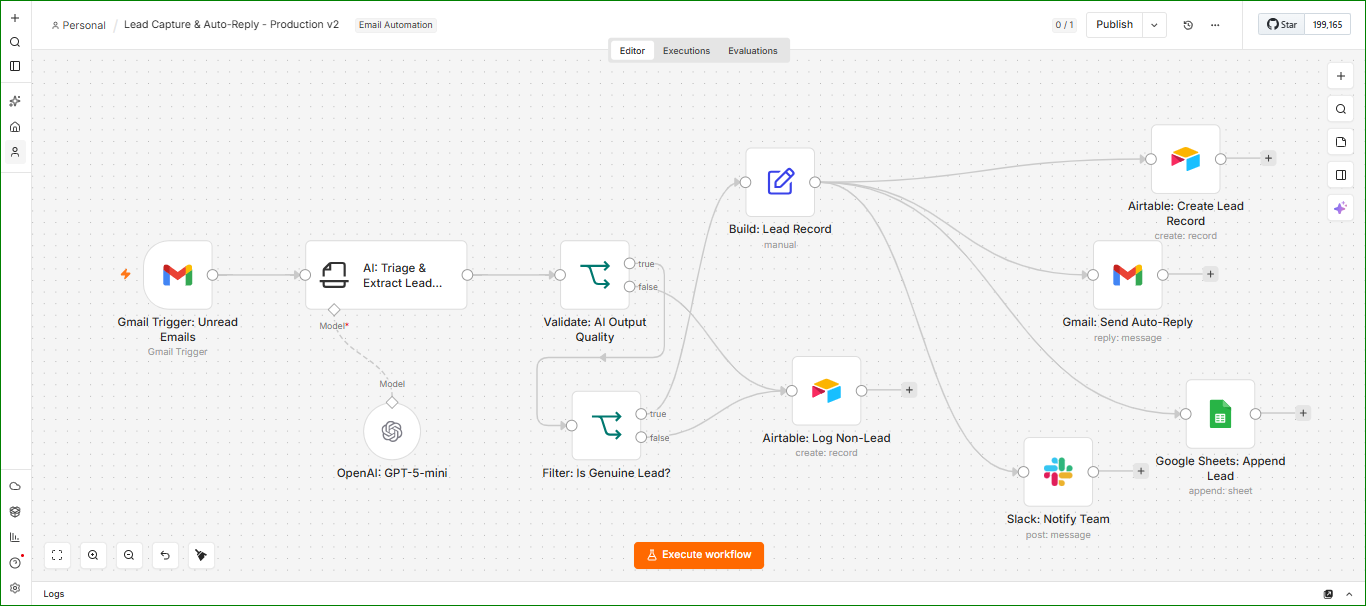
Email Lead Capture & Auto-Reply Pipeline automation workflow diagram

Watch it in action

n8n + Gmail + AirtableLead GenAI TriageCRM

Email Lead Capture & Auto-Reply Pipeline

The problem

Genuine enquiries sit unread in a busy inbox next to spam and newsletters, and slow replies quietly kill conversion.

The workflow

  1. 1Gmail trigger watches the inbox for unread mail.
  2. 2An AI triage step extracts the sender, intent and lead details from the message body.
  3. 3A validation branch checks the AI output quality, then a filter decides whether it is a genuine lead.
  4. 4Genuine leads build a structured lead record, create an Airtable record, append a row to Google Sheets and notify the team in Slack.
  5. 5A personalised auto-reply goes out from Gmail within moments; non-leads are logged separately for reference.

Every real enquiry is answered fast, enriched and logged in the CRM without anyone touching the inbox.

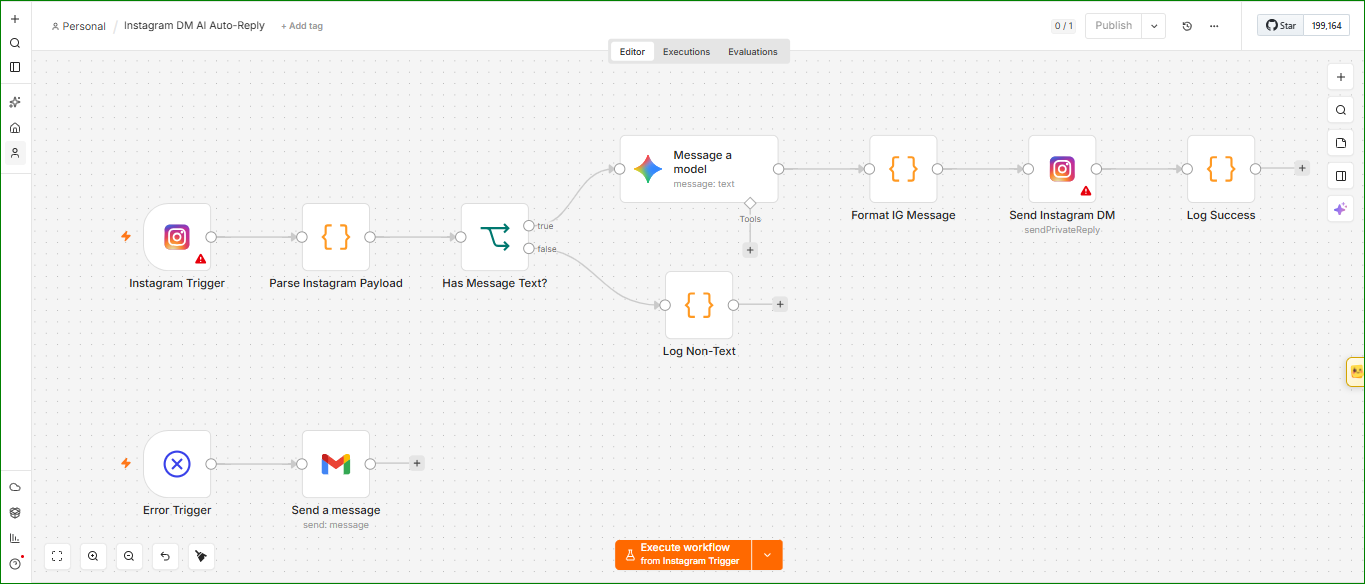
Instagram DM AI Auto-Reply automation workflow diagram
n8n + Instagram + GeminiSocialDM AutomationError Handling

Instagram DM AI Auto-Reply

The problem

DMs pile up overnight and on weekends. Buyers asking about price or availability go cold before anyone opens the app.

The workflow

  1. 1Instagram trigger fires on each new direct message and the payload is parsed.
  2. 2A check confirms the DM contains text; non-text messages are logged rather than mishandled.
  3. 3An AI model drafts a reply on-brand for the enquiry, with tools available for lookups.
  4. 4The message is formatted and sent back as a private reply, then logged as a success.
  5. 5A separate error trigger emails an alert the moment anything in the flow fails.

Round-the-clock DM responses with a safety net that tells you immediately if a message ever fails.

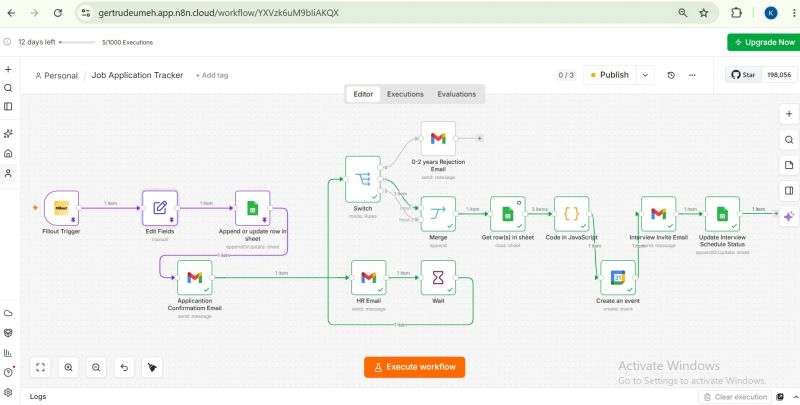
Job Application Tracker & Interview Scheduler automation workflow diagram
n8n + Google WorkspaceHiringScreeningScheduling

Job Application Tracker & Interview Scheduler

The problem

A single hiring round buries a small team in spreadsheets, confirmation emails and back-and-forth interview scheduling.

The workflow

  1. 1Application form submission triggers the flow and the fields are cleaned up.
  2. 2Each applicant is appended or updated as a row in the tracking sheet.
  3. 3The candidate receives an application confirmation email while HR gets a notification.
  4. 4A rules switch screens applicants by experience — under-qualified applicants get a courteous rejection automatically.
  5. 5Shortlisted candidates are merged back, an interview invite is sent, a calendar event is created and the sheet's interview status is updated.

Every applicant gets a reply, and the shortlist arrives already scheduled and tracked.

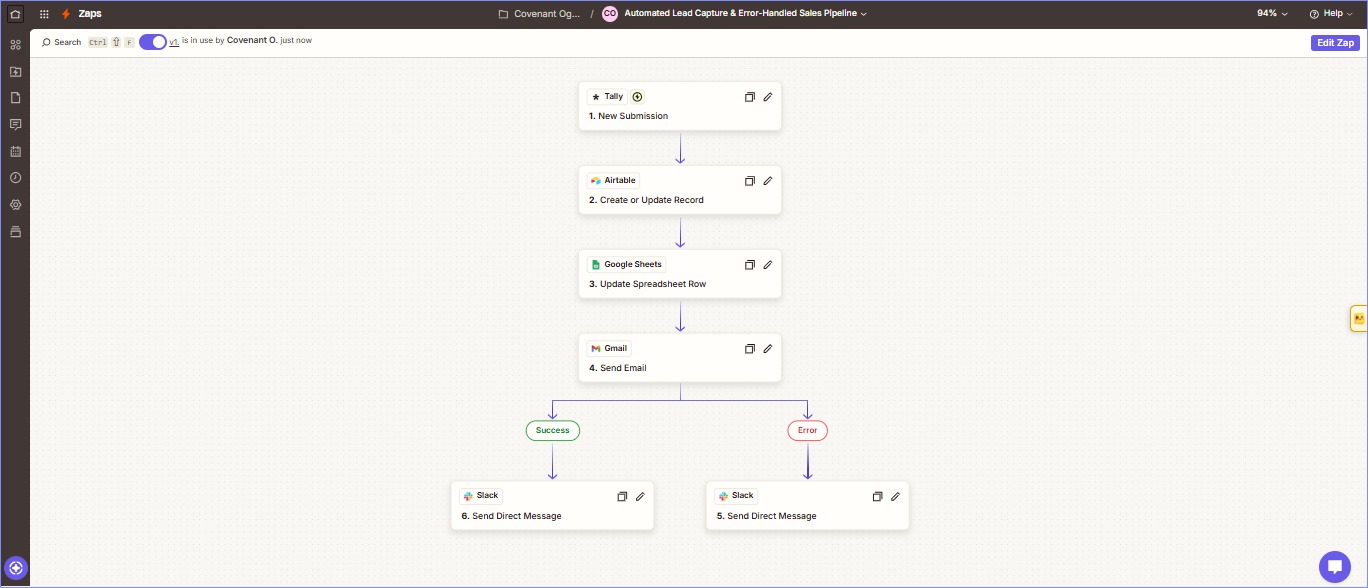
Error-Handled Sales Pipeline automation workflow diagram
Zapier + Tally + AirtableZapierSales OpsReliability

Error-Handled Sales Pipeline

The problem

Form leads get typed into a CRM by hand, and when an automation silently breaks nobody notices until a customer complains.

The workflow

  1. 1A new Tally form submission starts the Zap.
  2. 2Airtable creates or updates the lead record so duplicates never pile up.
  3. 3The master Google Sheet row is updated to keep reporting in sync.
  4. 4Gmail sends the lead a tailored acknowledgement email.
  5. 5Success and error paths split: a success Slack DM confirms the processed lead with full details, an error DM flags any failure instantly.

A hands-off lead pipeline that tells you the moment something needs attention instead of failing quietly.

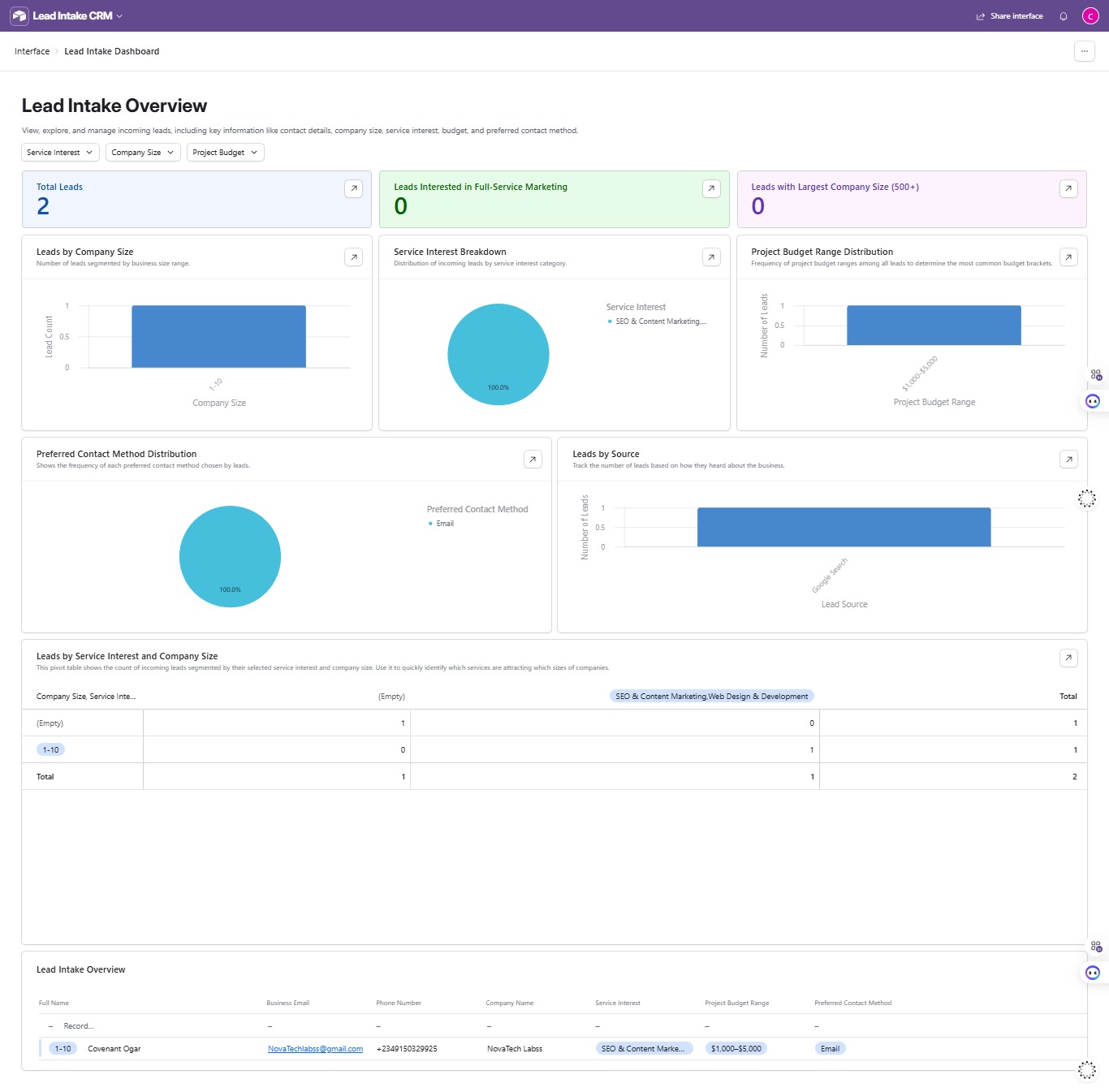
Lead Intake CRM Dashboard automation workflow diagram
Airtable InterfacesDashboardReportingCRM

Lead Intake CRM Dashboard

The problem

Lead data is captured but never looked at. Owners cannot see which services sell, which company sizes convert, or where enquiries come from.

The workflow

  1. 1All captured leads flow into a single structured intake base.
  2. 2An overview dashboard surfaces total leads and highlight segments at a glance.
  3. 3Charts break down company size, service interest, budget range, preferred contact method and lead source.
  4. 4A pivot table cross-references service interest against company size to show what sells to whom.
  5. 5Filters and a full records table let the team drill down to individual leads instantly.

One screen that turns raw enquiries into decisions about where to spend your marketing effort.

How we work together

01

Map

We walk through the manual work you repeat weekly and pick the highest-leverage one.

02

Build

I build the workflow in n8n, Zapier or Make with validation and error handling baked in.

03

Handover

You get a live automation, a walkthrough and documentation you can hand to your team.

Pricing

Cost is negotiable. Every business has a different scope, stack and budget, so we agree on a fair price together once I understand what you need — no fixed packages, no surprises.

Let's talk

Tell me the task you're tired of repeating. I'll tell you whether it can be automated and how.

Prefer working through a platform you already trust? You can hire me on Upwork with escrow and contract protection.

This opens your email app with the message pre-filled to laminarflowops@gmail.com.